คำศัพท์ใหม่ในทุกครั้งที่มองหน้าจอ.
วิดเจ็ตคำศัพท์ประจำวันยุคใหม่ที่กลมกลืนไปกับชีวิตประจำวันของคุณบน iPhone.
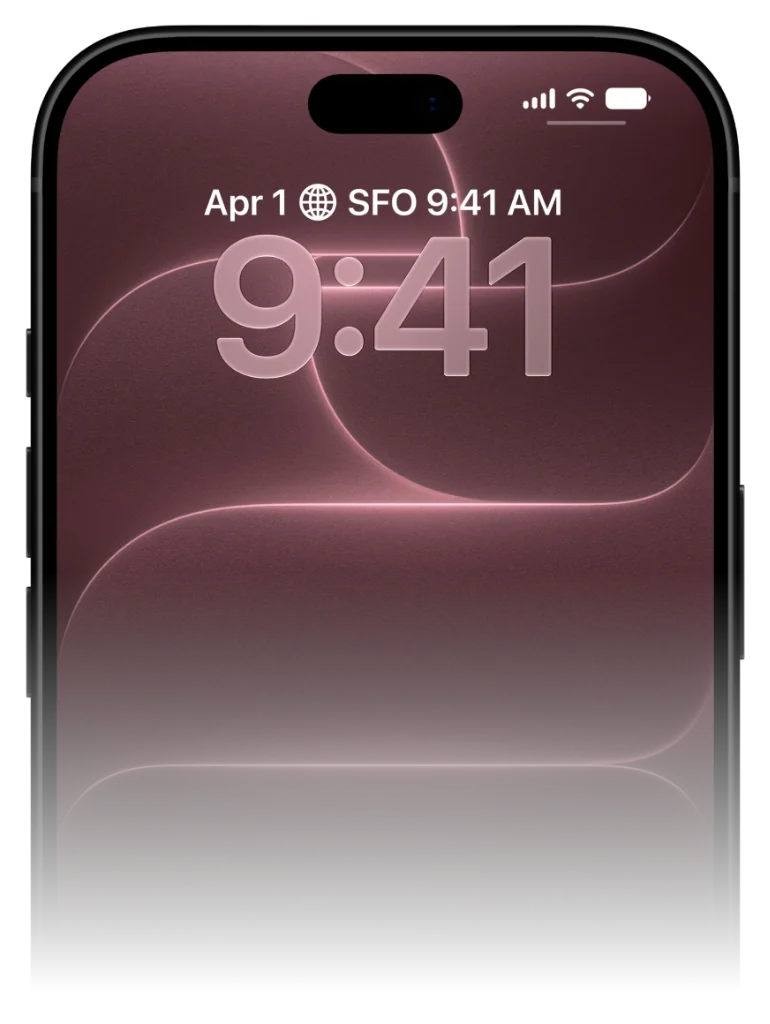
หมดยุคการรอการแจ้งเตือนที่มักถูกปัดทิ้ง VocabPin แสดงคำศัพท์ประจำวันค้างไว้บนหน้าจอเพื่อให้จำได้อย่างเป็นธรรมชาติ.
VocabPin ทำงานอย่างไร.
ไม่ต้องฝืนท่องจำวันละ 30 นาที ไม่ต้องกังวลเรื่องสตรีคขาด คำศัพท์จะปรากฏขึ้นอย่างเป็นธรรมชาติในจุดที่สายตาคุณมองอยู่แล้ว
เลือกคู่ภาษาและระดับความยาก
เรียนรู้ข้ามไปมาระหว่าง 17 ภาษาได้อย่างอิสระ เลือกระดับตามมาตรฐาน CEFR ตั้งแต่เริ่มต้น A1 ถึงระดับ B2/C1, JLPT หรือ HSK
เสียงอ่านแท้จากเจ้าของภาษา
เสียงบันทึกสตูดิโอความละเอียด 24kHz โดยเจ้าของภาษาตัวจริง แตะที่คำเพื่อฟังการออกเสียงและวรรณยุกต์ที่ถูกต้อง
ปักหมุดบนหน้าจอและเรียนรู้ผ่านการมอง
วางวิดเจ็ตเรียบหรูบนหน้าจอล็อคหรือหน้าจอโฮม การปลดล็อคโทรศัพท์กว่า 80 ครั้งต่อวันจะช่วยตอกย้ำความจำระยะยาวโดยอัตโนมัติ
เลือกคู่ภาษาและระดับความยาก
เรียนรู้ข้ามไปมาระหว่าง 17 ภาษาได้อย่างอิสระ เลือกระดับตามมาตรฐาน CEFR ตั้งแต่เริ่มต้น A1 ถึงระดับ B2/C1, JLPT หรือ HSK
Why traditional Word of the Day notifications fail
The notification trap and how ambient widgets solve it.
Traditional apps rely on push notifications. At 9:00 AM, your phone pings you with a word. But you're in a meeting, driving, or making breakfast. You swipe the banner away to clear your screen, promising yourself you'll look later. You never do.
VocabPin replaces intrusive notifications with ambient persistence. By placing the word of the day inside a native iOS widget, the word stays visibly present throughout your entire day.
Every glance at your clock or calendar naturally exposes your retina and subconscious mind to the word, creating between 60 to 100 effortless passive exposures every day.
The average iPhone user checks their screen over 80 times a day. VocabPin turns every single glance into a subconscious vocabulary rehearsal.
Configured for your exact CEFR or test level
Never too easy. Never overwhelmingly difficult.
A major frustration with generic Word of the Day apps is seeing words you already know, or seeing bizarre archaic terms you will never speak in real life.
With VocabPin, you select your exact level—from CEFR A1 (Beginner) up to C2 (Mastery), or standardized tests like JLPT (N5–N1) and HSK (1–6). Every daily word is calibrated to your current edge of comprehension.
Lock Screen and Home Screen in sync
Accessory Rectangular and System Medium widgets working in harmony.
Set an Accessory Rectangular widget on your Lock Screen for a quick, glanceable monochrome reminder.
Add a System Medium card on your Home Screen when you want richer typography, grammatical gender indicators, and full sentence context.
ตั้งค่าบน iPhone เสร็จภายใน 30 วินาที
ทำงานแบบเนทีฟตั้งแต่ iOS 17 ถึง iOS 27 โดยไม่ต้องตั้งค่าซับซ้อน
แตะหน้าจอค้างไว้
แตะหน้าจอล็อกหรือหน้าจอโฮมค้างไว้จนกว่าปุ่ม 'ปรับแต่ง' จะปรากฏขึ้น
เลือก VocabPin
แตะช่องวิดเจ็ตใต้นาฬิกาหรือปุ่ม '+' ที่มุมบน แล้วค้นหา VocabPin
เลือกภาษาและระดับ
เลือกภาษาเป้าหมายและความถี่ในการเปลี่ยนคำศัพท์ แล้วแตะ 'เสร็จสิ้น'
ภาษาที่รองรับสำหรับวิดเจ็ตนี้
ทุกภาษามาพร้อมฟอนต์มาตรฐาน Apple เสียงอ่านเจ้าของภาษา และระดับ CEFR/JLPT/HSK
คำถามที่พบบ่อย
คู่มือเชิงลึกและวิทยาศาสตร์การเรียนรู้
How to Set Up a Word of the Day Widget on iPhone
Everything you need to turn your iPhone into an ambient daily vocabulary builder. Learn how to pick the right CEFR level, configure refresh intervals, and pair with audio.
How Often Do iPhone Widgets Update? iOS Timeline Explained
Ever wondered why some iOS widgets freeze while others update smoothly? Dive into Apple's WidgetKit architecture, timeline budgets, and how VocabPin ensures reliable offline rotation.
วิธีจำคำศัพท์แบบซึมซับ: วิทยาศาสตร์เบื้องหลังการเห็นคำศัพท์ซ้ำๆ
จิตวิทยาการรู้คิดเบื้องหลังการเรียนรู้แบบซึมซับ: ทำไมการชำเลืองมอง 80 ครั้งต่อวันจึงได้ผลดีกว่าการนั่งท่องคำศัพท์ 30 นาที.